

Previous page

Next page

Check Transactions in Multiple Pays

This topic shows how to simultaneously view Standard Pay # W/1 and the manual pay in Transaction View so you can check Linda Johnstone’s transactions.

You are in Transaction View for the manual pay.

  1. Press Ctrl+B or click the Sequences button in the tool bar.

    Note: Do not click the Sequences drop-down list button.

    The Pay Sequences form appears.
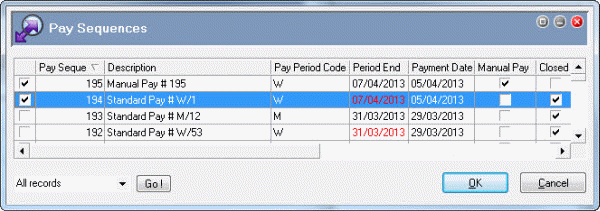
  2. Click the checkbox for closed Standard Pay # W/1.

    PaySeqs-66+67

  3. Click OK to return to Transaction View, which how displays Standard Pay # W/1 and the manual pay.
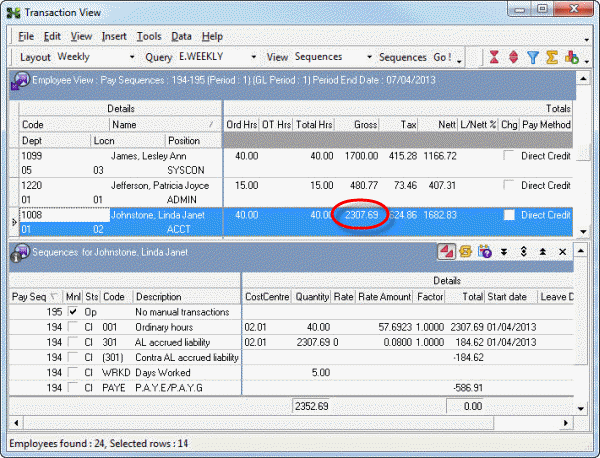
  4. Click Linda Johnstone's record so you can check her transactions in the Drill Down area.

    Manual Pay:

    Linda has no transactions in this manual pay.

    Standard Pay # W/1:

    This closed pay sequence contains Linda’s final week’s pay, which has a gross value of $2,307.69.
    TV-66+67

    You do not need to display Standard Pay # W/1 to add the termination transaction.

  5. Press Ctrl+B or click the Sequences button in the tool bar.

    The Pay Sequences form appears.

  6. Click the checkbox for Standard Pay # W/1 to untick it.
  7. Click OK to return to Transaction View, which how displays only the manual pay.

Previous page

Next page

Topic: 23365