

|
|
|
|
|
|
This topic explains how to use Delete Employee from Pay Sequence to delete an employee's transactions from an open pay.
You are on Linda Johnstone's record in Transaction View for Standard Pay # W/1, Standard Pay # W/2 and Manual Pay # 3.
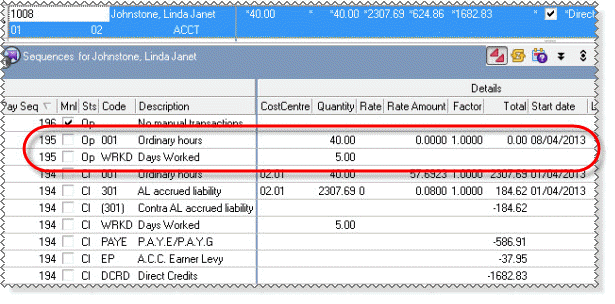
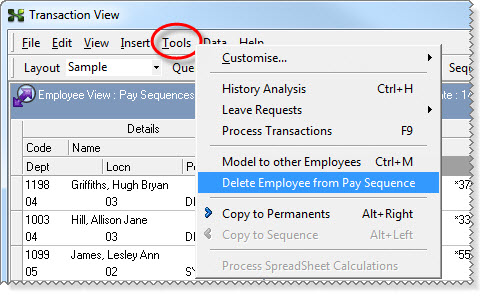
Important: You must click in the Drill Down area to enable the Delete Employee from Pay Sequence option.
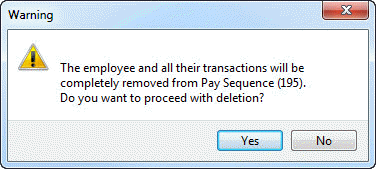
A Warning message appears.
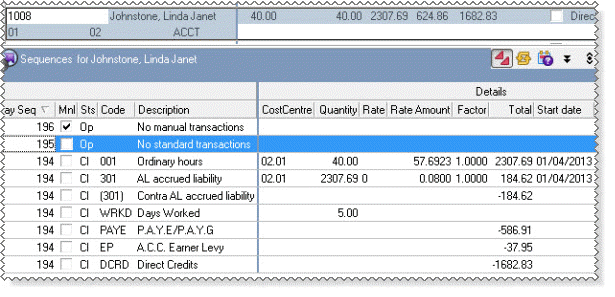
Linda no longer has any transactions in Standard Pay # W/2.
You can now complete Steps 3 and 4 of this termination process. See Appendix - Termination with Transactions in Other Open Pay.
When you process Linda's transactions, the following warning appears in the audit log:
!30 WARN Open pays still exist for this employee. It is recommended that you close relevant pay sequence(s) before processing this pay, to ensure the employee receives correct Annual Leave payment.
This message refers to Standard Pay # W/2 because although Linda does not have any transactions in this pay, she is still in it. However, you can still successfully close the manual pay.
 |
Topic: 23430


