Appendix - Termination with Transactions in Other Open Pay
Termination Transactions shows how to process a simple termination for an employee who does not have any transactions in other open pays. This appendix explains how to terminate an employee who has transactions in another open pay.
In this scenario, the termination process may have an extra step:
- Check other open pays. In this example, the employee has transactions in another open pay so you need to check whether the employee should have these transactions.
- If the employee should have these transactions, then you must close the pay before you terminate the employee so the employee’s leave calculations are correct and you can process the transactions. This manual does not cover this situation because it does not change the basic termination process.
- If the employee should not have these transactions, then you must delete employee from the other open pay.
- Delete the employee's transactions from the other open pay. You cannot manually delete all the employee's transactions from a pay, you have to use the Delete Employee from Pay Sequence menu option to delete all the employee's information, including their pay header.
- Add the termination transaction — see Add a Termination Transaction.
- Check that the termination conforms to the NZ Holidays Act 2003 — see "PH not worked" Transaction.
This appendix explains Step 1 and Step 2 in this termination process. Steps 3 and 4 are covered in Termination Transactions.
In this example, you closed Standard Pay # W/1, opened Standard Pay # W/2, and then opened a manual pay. You adjusted the manual pay accumulators — see Manual Pay Accumulators — so the Pay Status form shows the following details:
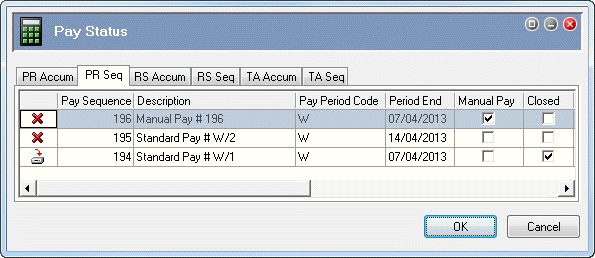
Linda Johnstone is a weekly employee who is resigning, and her termination date is 30/03/2012. Linda received her final week’s pay in closed Standard Pay # W/1. However, when you opened Standard Pay # W/2, Exolvo copied across 40 ordinary hours from Linda’s permanent transactions and created a pay header.
In the following topics you will:
- Check transactions in multiple pay sequences to confirm that open Standard Pay # W/2 contains transactions for Linda Johnstone that she should not have.
- Use the Delete Employee from Pay Sequence option to delete Linda's information from Standard Pay # W/2.
Topic: 23366