

|
|
|
|
|
|
Accumulators are pre-determined date ranges that sort funds into common groups. These groups are then used for reporting and costing purposes.
Some examples of accumulators are:
Accumulators store summary values that are used in financial reporting. Having the summary values in accumulators speeds up the running of financial reports. Instead of having to process all values, Exolvo only needs to process a few accumulators. Exolvo allows you to set up your own accumulators, but this advanced function is not covered in this manual.
Accumulators are very important in manual pays. When you open a manual pay, Exolvo automatically assigns it the accumulators for the most recently opened standard pay of the same period type. However, this is not always correct because the manual pay period might not be the same as the most recent standard pay period. Assigning a manual pay to the incorrect accumulator can have far-reaching consequences for your organisation’s financial reporting.
Important: Always ensure that manual pays are assigned to the correct accumulators, and change the accumulators if necessary.
Some companies open numerous manual pays during a pay period, and then open the standard pay near the end of the pay period. The accumulators for these manual pays would need to be set forward to match those of the standard pay. You would do this to ensure that the manual pays fell in the required tax period and/or reporting periods.
You can also use a manual pay to make payments for a previous tax period or pay period. However, you need to adjust the accumulators for the manual pay so that the correct accumulators are updated when you close it.
If you run reports for a pay period and later adjust manual pay accumulators to that period, then you must rerun those reports to include the manual pay transactions.
The previous section used a 'best practice' example in which you did not need to adjust the manual pay accumulators — see Opening a Manual Pay. However, in this example, you opened another weekly standard pay (W/2) before you opened the manual pay so the Pay Status form shows the following details:
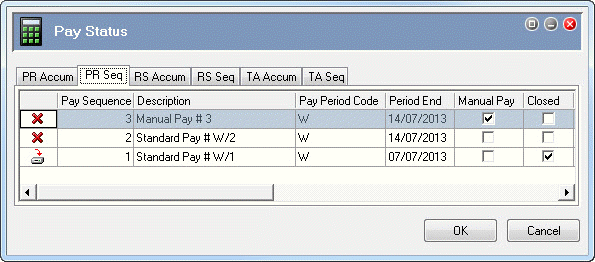
When you opened the weekly manual pay, Exolvo automatically assigned it accumulators for the most recently opened weekly standard pay, which was Standard Pay # W/2. However, you will use the manual pay to add transactions that need to be included in Standard Pay # W/1, so you need to adjust the accumulators for this manual pay.
 |
Topic: 39193


