|
|
|
|
|
|
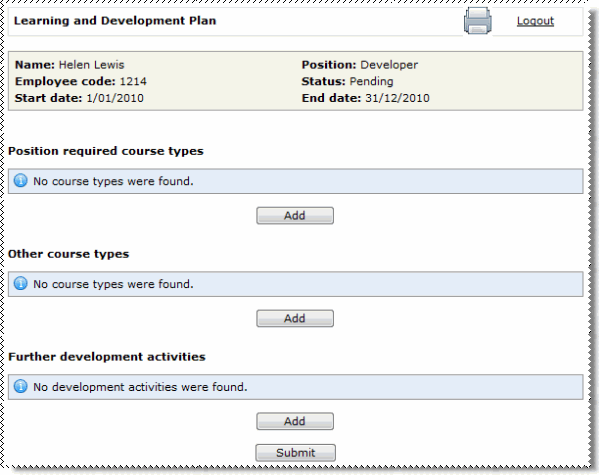
Use the Learning and Development Plan page to create and submit your Development plan. After your manager approves your plan, you can book yourself on the course types that you requested in your plan.
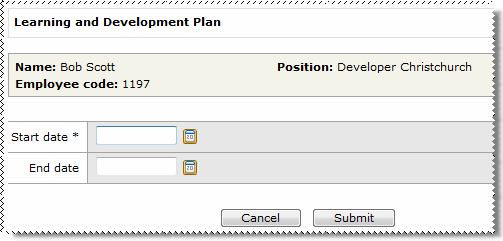
I do not see the screen above If a Learning and Development Plan has not been created for you, then you can create one yourself. Enter dates for your plan and click Submit.
|
This section displays courses that are training requirements for your position. Select the course types that you want to add to your plan. You can use the Position Gap Analysis page to see the courses that you need to complete.
This section displays additional courses that are not training requirements for your position. Select the course types that you want to add to your plan.
This section displays a list of activities for you to complete that are not course related.
When you click the Add button, the Further development activities form appears.
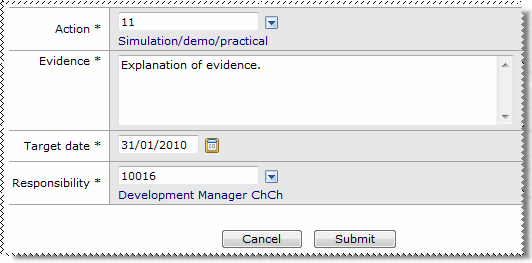
The following table explains the Further development activities form.
Field Name |
Details |
|---|---|
Action |
Select an action from the pick list. |
Evidence |
Type an outcome of completing the action. |
Target date |
Select the date that you will complete the action by. |
Responsibility |
Select the WAP of the person who will be responsible for ensuring that you complete the action. |
Note: You do not need to complete the Development plan in a single session. If you leave the Development plan area or log out of ESS, your changes will be retained.
 |
Topic: 28172