|
|
|
|
|
|
When one of your employees applies for leave, you are notified by email. The following example explains how to view the leave request.
By default, Employee Leave opens on the Requests tab.
Depending on your configuration, you may also see the Declined leave section, which displays leave requests that have been declined.
Pagination is enabled on the Unapproved, Approved and Declined grids, restricting the number of requests to 20 per page respectively (by default). This can be modified or set to show all requests by your Self Service administrator.
Use the First, Previous, Next and Last links to navigate around the particular table. The page number that you are currently viewing is displayed between these links.
The example below shows pagination set as 4 requests per page.
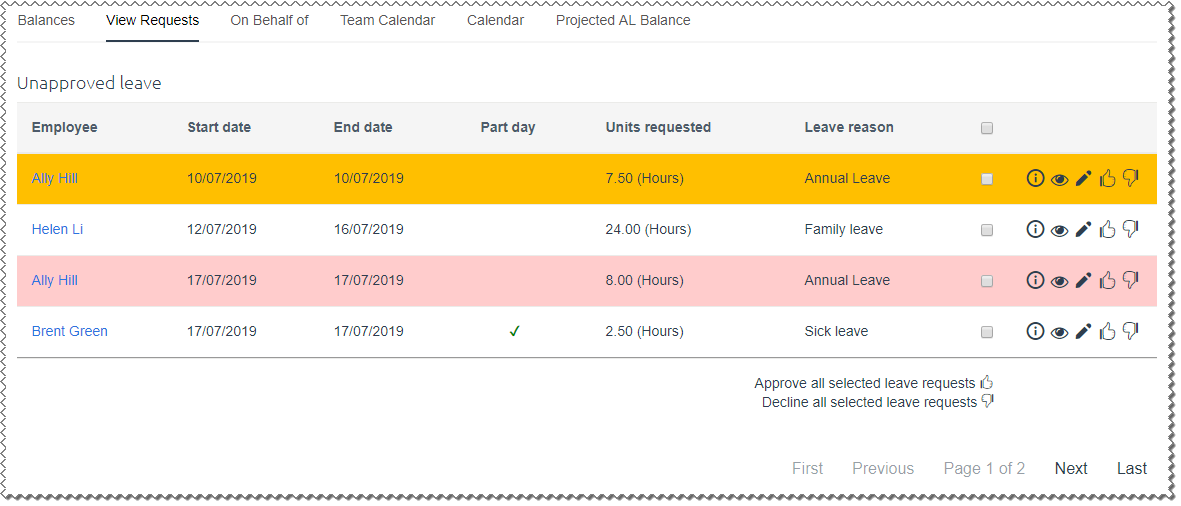
Note: If you are accessing this page as an admin user, then you will also see a Department column next to the Employee column.
Partial leave
Employees can apply for one or more partial day leave requests on a day. For example, they can apply for sick leave in the morning and annual leave in the afternoon. Partial leave requests will have a tick in the "Part day" column (see Brent Green's unapproved request in the image above).
Insufficient leave balance
If an employee requests a greater number of leave days than their current balance, then their leave request is generally highlighted on your Requests tab (as shown above for Ally Hill). Your Self-Service Administrator sets how ESS handles an insufficient leave balance (see Compliance Checking).
The Requests tab has the following options:
|
Click the Info icon to view a popup showing the information on the Leave Balances tab page — for this employee only. |
|
Click the View icon to open the leave request details. |
|
Click the Approve icon to approve the leave request. |
|
Click the Decline icon to decline the leave request. |
|
Click the Edit icon to edit a leave request. See Editing a Leave Request. |
|
If an employee asks you to delete a leave request on their behalf, then click the Delete icon to delete the leave request. |
The employee is notified by email when you approve, decline, edit or delete their request. |
|
Note: Employees may be able to edit and delete their own leave requests after you have approved them.
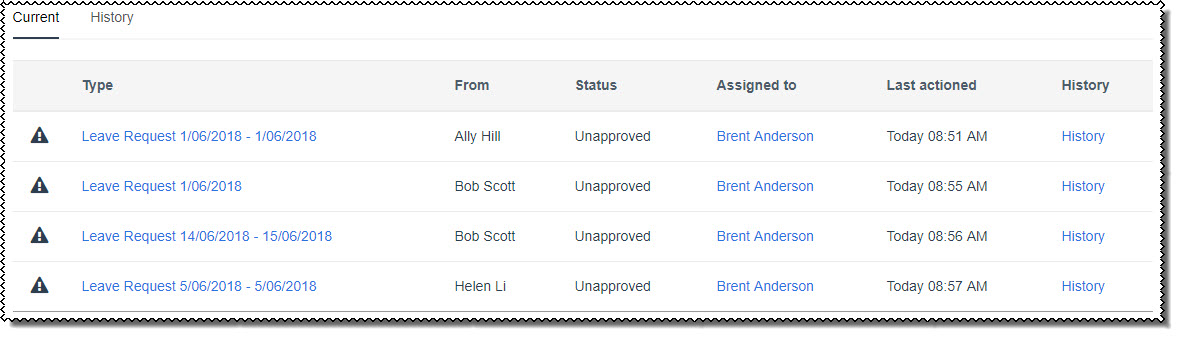
Active Items Leave requests are also displayed in your Active Items. The Leave Request link displays the start and end dates of the leave request (or the leave date for partial leave requests).
|
 |
Topic: 40879