

|
|
|
|
|
|
Brent Green has Timesheet Settings = "1. Total by timesheet".
Brent submits the following timesheet:
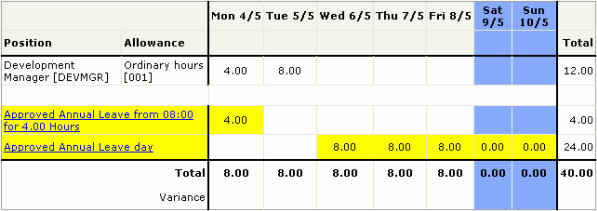
When the Timesheet Admin (or Self-Service Scheduler) finalises approved timesheets, the CSV file is written to the Timesheet allowance output directory.
You will import this file directly into Transaction View using the following process:
After you Import Pay, you can view the transactions in Transaction View. The following image also shows the car allowance entered in Timesheet example - Allowances.

Brent's leave requests are in Leave Request View. You must process the required requests to create the leave transactions (see Viewing leave requests).

Public holidays
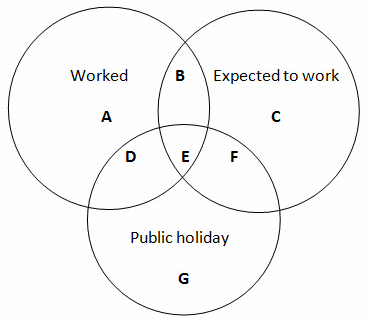
The image and table below explain when allowances are created for public holidays.
Note: Public holiday information is displayed in the Notes field in some of the scenarios shown below (see ESS Notes). Use the information in the Notes field to update public holiday transactions as required after they have been imported into PayGlobal.
Ref |
Details |
Export file |
A |
|
Allowance created as normal. |
D |
|
Allowance created as shown below.
|
E |
|
Allowance created as shown below.
|
F |
|
Allowance created as shown below.
|
G |
|
Allowance not created in export file.
|
B |
|
Allowance created as normal. |
C |
|
Allowance not created in export file. |
What allowance does the transaction use?
Public holiday transactions are created using the allowance code attached to (1) the holiday record or (2) the holiday group. If an allowance is not attached to either the holiday or the holiday group, then the transaction is not created.
|
|
|
 |
Topic: 37945


